The work list
Mine and Queue, why the list is ordered the way it is, the chips on a row, and searching the archive.
The left column, and the one question it exists to answer: which of these is waiting on me.
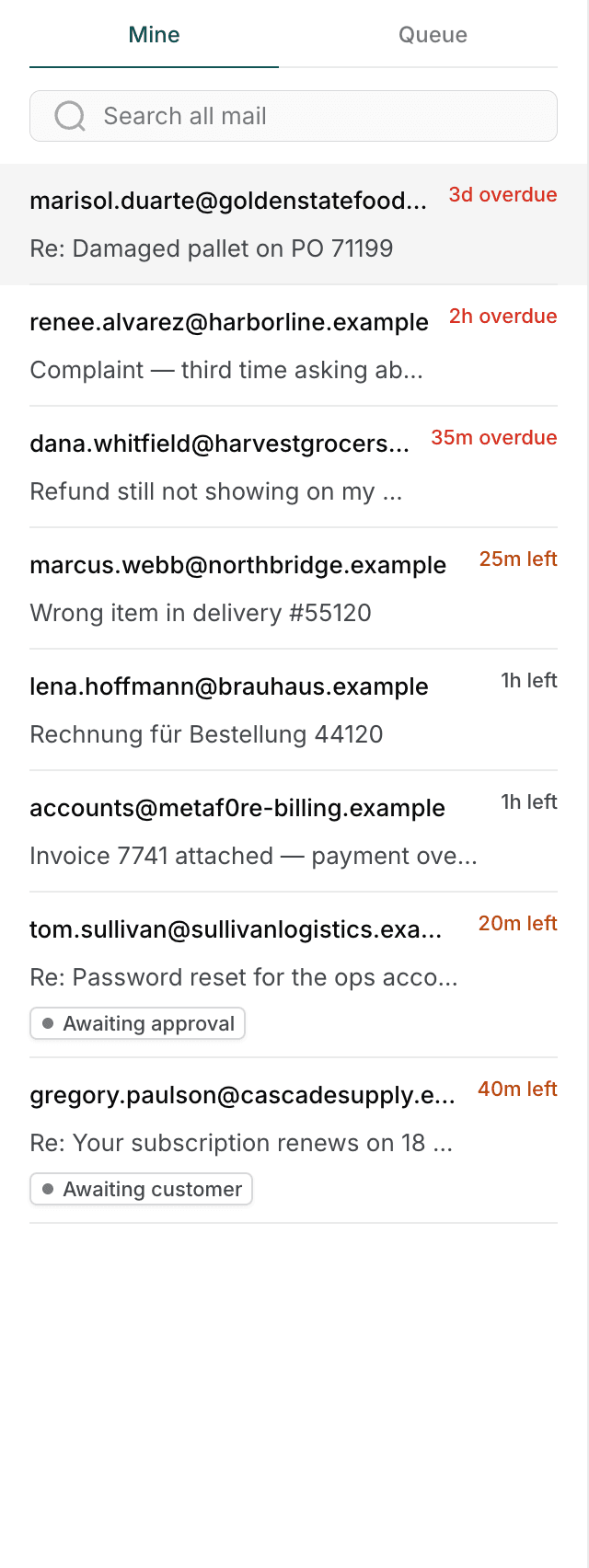
Mine and Queue
| Tab | What is in it |
|---|---|
| Mine | Threads assigned to you, including ones you have parked. |
| Queue | Threads nobody has claimed yet. |
Mine is where your shift happens. Queue is where you look when your own list is clear, or when someone asks you to pick up something specific.
A thread in the queue is not yours until you take it — see Replying.
Why the list is in that order
Mine puts the work you can move first, soonest deadline at the top. The thread at the top is the one closest to breaching that you can actually do something about — whether that is because it is nearly due or because it is already overdue.
Overdue threads come first, worst overdue at the very top, and the rest follow in the order their deadlines fall.
Threads waiting on somebody else sit underneath, in the same order. A thread you have parked on the customer, or one waiting on a supervisor's approval, has no move in it for you, so it does not take a slot above work that does. It still shows its deadline, and an overdue one still sits above a parked thread with time left — a breach is placed lower, never hidden.
The desk opens on the top row. When you arrive with nothing selected, the most urgent thread you own is already open — there is no "pick one" step. It only ever does this once. If a newly breached thread takes the top slot while you are reading something else, you are not moved off it.
Queue rows are ordered by the routing service, and each row says why it is where it is, under the subject. An ordering you cannot see the reason for is one people work around.
The deadline tag
Every row starts with a small tag: the time left on this thread's deadline, or how long that deadline has been missed.
| Tag | Meaning |
|---|---|
2h left | Due in about two hours. |
25m left | Due in about twenty-five minutes. |
35m overdue | The deadline passed thirty-five minutes ago. |
"Left" and "overdue" are opposites, and they are one word apart. Read the
word, not just the number. 35m left and 35m overdue sit in the same place
and look alike at a glance.
The tag shows whichever deadline is still running. Threads have two: one for sending a first reply, one for resolving the thread. Until you have replied, the tag counts down the first. Once your reply is out that deadline is met, so the tag switches to the one you are still working against — the time to resolve.
This is why a thread you answered days ago can show as overdue: the first reply went out in time, but the thread is still open and its resolution deadline has passed. Both clocks are listed together in the context pane — see The context pane.
The chips on a row
Rows carry at most two chips, and both are about what to do next rather than what already happened.
The state, when it is not the one the tab already implies. On Mine, a row saying "Awaiting customer" is telling you this one is not waiting on you. On Queue, anything other than "Queued" is worth a second look.
Undeliverable, in red. The last reply to this address bounced, so the reply this row is inviting you to write will probably bounce too.
Everything else a thread knows about itself — whether the AI resolved it, how many times it has been reopened, whether a draft needs review — is on the thread itself, where there is room to say it properly.
Search
The box under the tabs searches all mail, not the two lists above it.
That is the point of it: Mine and Queue are live work, and a search is how you reach a thread that left both of them weeks ago. Closed threads are included. Results replace the list rather than filtering it.
Clear the box, with the × or by deleting the text, to go back to the tabs.
A search that finds nothing says so in the column. "No mail matches …" appears where the rows would be, so an empty result is an answer to your question rather than the desk looking broken.
If there are more matches than fit, the list says so — More matches than shown — add a word to narrow it. It will never quietly hand you the first fifty of four hundred.
Searching does not auto-select anything. The answer to a question you asked is the list, not its first row.