Getting started
The two capacity numbers, what the empty desk is telling you, and where everything sits on screen.
From signing in to your first thread.
The layout
The desk is three columns.
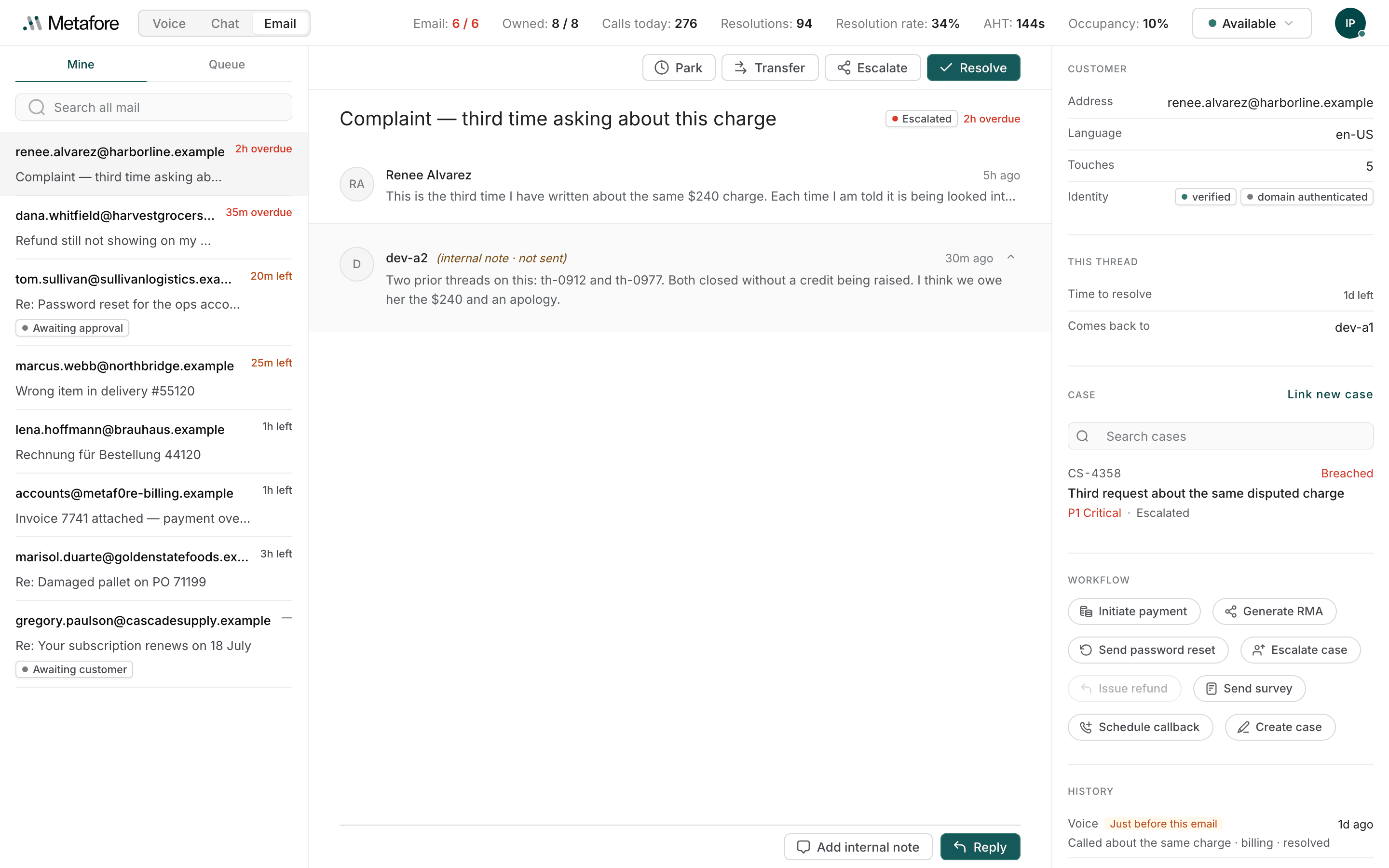
- The work list, on the left: Mine and Queue, and a search box that reaches everything else.
- The thread, in the middle: what to do with it along the top, the conversation underneath, and the reply controls at the foot.
- The context pane, on the right: who wrote in, their open cases, and everything they have contacted you about before.
Your two numbers
The workspace header carries two counts for email, not one:
Email: 6 / 6 Owned: 8 / 8| What it counts | |
|---|---|
| Threads you are actively working — the ones taking your attention now. | |
| Owned | Everything assigned to you, including parked threads. |
Each is shown against its limit, and your organisation sets both. Email turns red when you have reached it: routing stops offering you threads until one of them moves.
The reason there are two is that email is slow. A thread you have parked while waiting for a customer is still yours — you will get it back — but it is not taking any of your attention today. One combined number would either stop sending you work you have capacity for, or keep sending it when you are already mid-reply on four threads.
Parked threads stay yours and hold no slot. That is the whole point of parking: see Moving a thread on.
Availability
Mail reaches you only while your status is Available, and it is the same status control the Voice and Chat desks use — one status across every channel.
When nothing is on the desk, it fills with a single message instead of three empty columns, and that message says which of five situations you are in:
| What it says | What it means |
|---|---|
| You're offline | Signed in but not taking work. Select Mark as available to start. |
| You're currently not ready | You set yourself Not ready. Switch to available and mail is assigned to you again. |
| You're busy on other work | New mail waits in the queue until you're free. |
| Your inbox is clear | You're available — new mail is assigned to you as it arrives. |
| Nothing to work on | Everything you had is done. Check the Queue tab for anything unclaimed. |
Mail is never lost while you are away. It keeps arriving in the queue, and your supervisor can see you are not ready — so a short break needs no message.
Two notices that are not your fault
Two messages appear across the top of the desk rather than in the empty state, because neither is something you can fix by going available.
"Your profile does not include the email channel." This desktop is not signed in to email at all. Ask an administrator to add the channel to your profile.
"Your email thread limit is 0, so no thread can be offered to you." You are on the channel, but your limit is set to zero — so routing has nothing it is allowed to give you. This is a configuration nobody will notice unless you say something.
The desk keeps itself current
You do not need to reload. The list refreshes on a timer, the open thread refreshes faster than the list, and a customer's reply pushes itself to your screen as it arrives.
A reply that landed while you were in another tab is there when you come back.