Monitoring a call
Silent monitor, whisper and barge — what each does, who can hear you, and how to switch between them.
You can join any live call on your team in one of three ways. They differ in one respect that matters more than any other: who can hear you.
Check which mode you are in before you speak. Monitoring is silent, whispering reaches the agent only, and barging is heard by the customer. The panel always states the current mode — read it before saying anything you would not want the customer to hear.
The three modes
| Mode | The agent hears you | The customer hears you | Anyone can see you |
|---|---|---|---|
| Monitor | No | No | No — you are hidden from both |
| Whisper | Yes | No | No — you remain hidden |
| Barge | Yes | Yes | Yes — you are a visible participant |
All three are recorded against your name. Every time you start, switch or leave a session it is logged with who you are and which call it was. Monitoring is sensitive, and the record exists so it can be accounted for.
Starting a session
There are two ways in.
From the detail panel. Select an agent's row to open the panel, then choose Monitor call, Whisper (coach) or Barge.
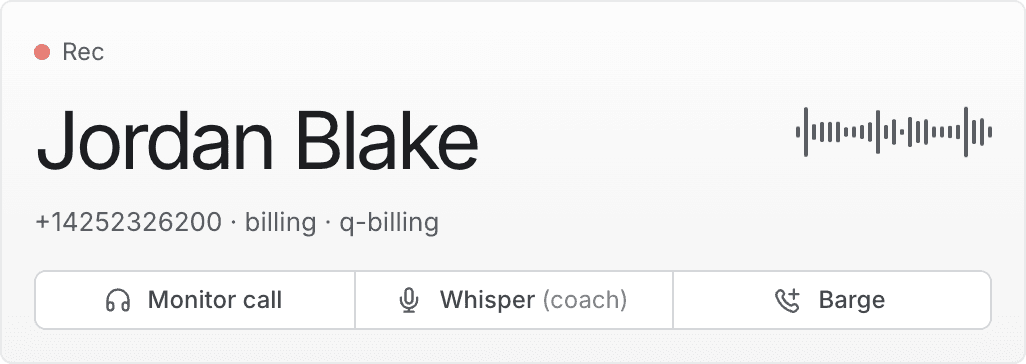
From the roster directly. Right-click any agent who is on a call for a shortcut menu, and pick the mode you want. This opens the panel and starts the session in one step.
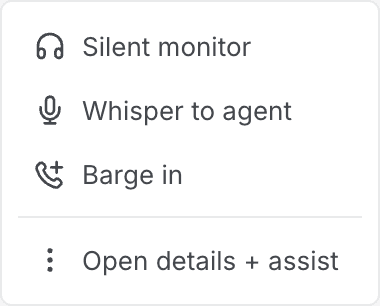
The shortcut menu only appears on rows for agents actually on a call — there is nothing to join otherwise.
Silent monitor
Listening only. You hear both the agent and the customer; neither hears you, and neither is told you are there.
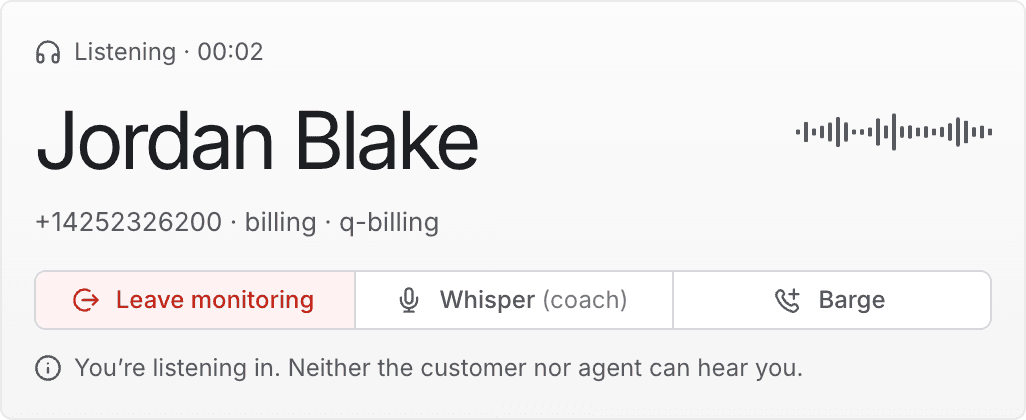
Three things confirm the mode: the line above the caller's name reads Listening with a timer, the first button becomes Leave monitoring, and a note beneath the buttons states that no one can hear you.
Monitoring never asks for your microphone. Nothing is published, so your browser has no reason to prompt. If you are asked for microphone access, you have started whispering or barging instead.
Use it to hear a call before deciding whether to act — for a red emotion reading, a long call, or a routine quality check.
Whisper
Private coaching. The agent hears you; the customer does not. The agent keeps talking to the customer while you speak to them.
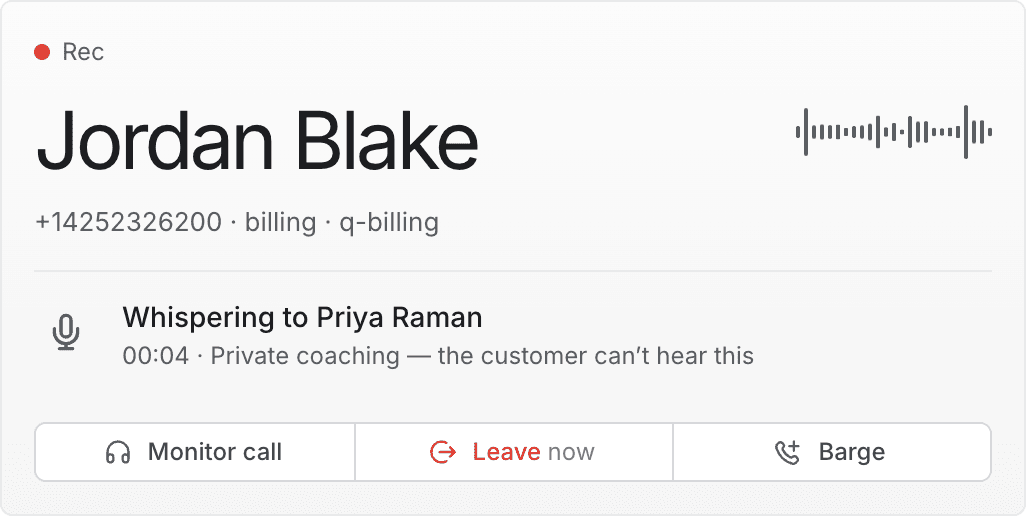
The panel names the agent you are coaching and repeats that the customer cannot hear it. The middle button becomes Leave now.
Keep it short. The agent is holding a conversation with a customer while listening to you. A long explanation is harder to act on than one sentence, and the silence it causes is audible to the customer.
Barge
Joining the conversation. Both the agent and the customer hear you, and you become a visible participant on the call.
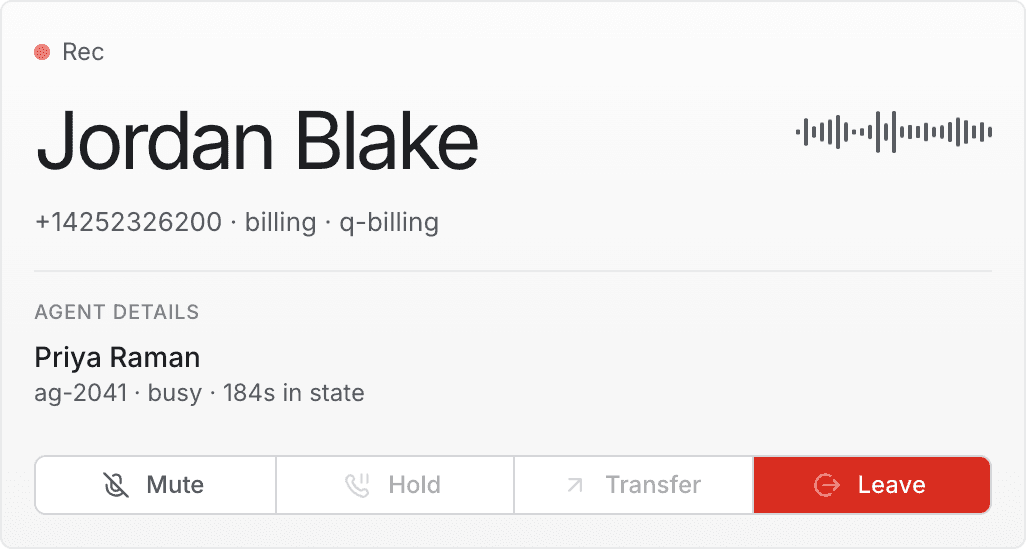
A red Live badge appears at the top of the panel, an Agent details section replaces the coaching note, and the buttons change to a different set.
| Control | What it does |
|---|---|
| Mute / Unmute | Turns your own microphone off and on. The call continues without you. |
| Hold | Not yet available from this screen. |
| Transfer | Not yet available from this screen. |
| Leave | Ends your part of the call. The agent and customer continue. |
Introduce yourself. From the customer's point of view a new voice has appeared on the line unannounced. Say who you are and why you have joined before going further.
Hold and Transfer are shown but unavailable. The controls appear so the set is complete, but they cannot be used yet — the underlying capability is not built for supervisors. Hovering over either explains why. If a barged call needs holding or transferring, ask the agent to do it.
Switching between modes
You do not have to leave a session to change how you are joined. The buttons stay available throughout, so you can move straight from one mode to another:
- Monitor → Whisper when listening tells you the agent needs a steer.
- Whisper → Barge when coaching is not enough and you need to speak to the customer.
- Barge → Monitor to step back out of the conversation while still listening.
Each switch is logged the same way as starting a session.
Moving to barge puts you on air immediately. There is no confirmation step between whispering and barging. The customer hears the next thing you say.
Leaving
Select the red Leave button — labelled Leave monitoring, Leave now or Leave depending on the mode. Your audio stops, you are removed from the call, and the agent and customer carry on.
Closing the panel also ends the session.
Leaving ends your participation only. It never ends the customer's call.
If your microphone will not open
Whispering and barging need a working microphone. If yours is blocked, missing or in use by another application, the session does not enter that mode. Instead:
- A message appears at the bottom of the panel saying what went wrong and what to do.
- You are kept listening to the call rather than dropped from it.
This is deliberate. Rather than showing "Whispering" while nothing is actually being transmitted, the panel tells you the truth and keeps the half that works. If you see that message, assume the agent did not hear you.
Fixes for each cause are in Reference.