Responding to help requests
How an agent's request for a supervisor reaches you, and how to pick it up.
An agent on a call can select Ask Supervisor on their own screen to signal that they need help. The call is not interrupted and the customer hears nothing.
How the request reaches you
It appears in one place: the agent's row in the roster. The row is tinted and a Needs Help chip appears beside their name.

Nothing else announces it. There is no banner, no sound, no notification and no count in the header. A request is only visible to a supervisor who is looking at the roster at the time. If your team raises requests regularly, keep the desktop on screen rather than relying on being alerted.
Picking one up
Select the row. The panel opens with the Needs Help chip repeated in its header, so you can confirm you have the right agent.
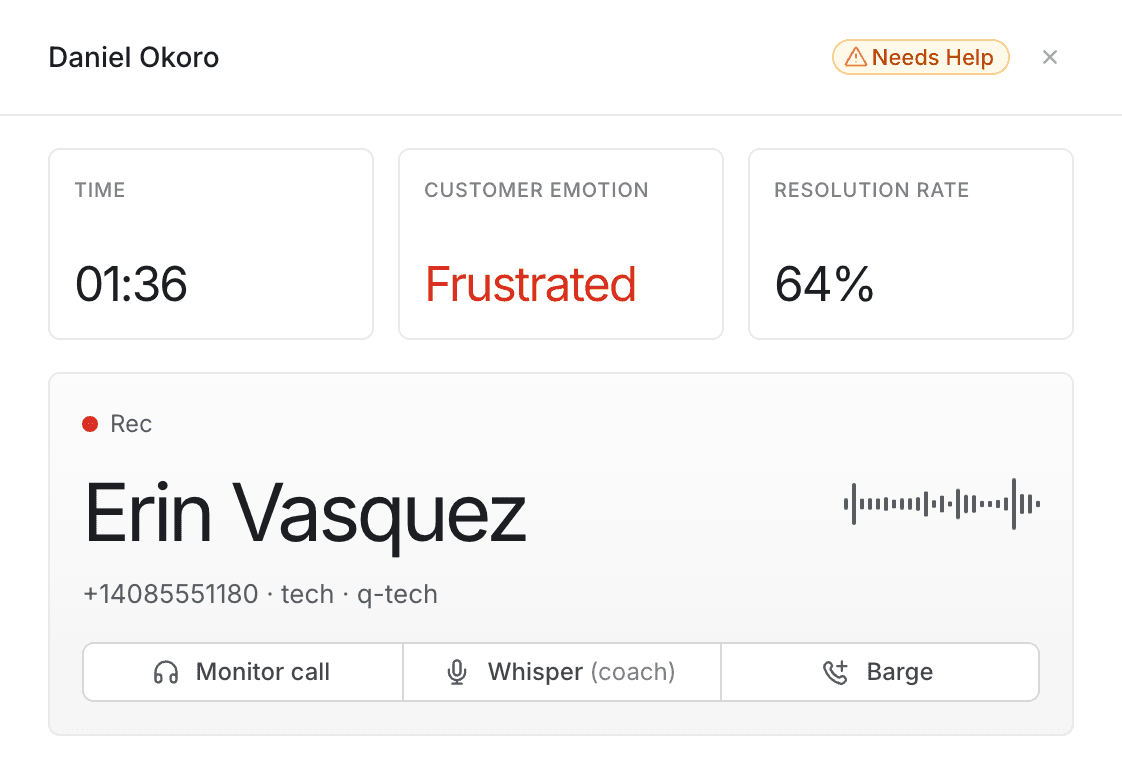
From there, respond the way the situation calls for:
- Monitor first, to hear what is actually happening before acting.
- Whisper to coach the agent without the customer hearing.
- Barge if the call needs you to speak to the customer directly.
Each is described in Monitoring a call.
Read the panel before you act. Customer emotion and hold time usually tell you within seconds whether this needs coaching or intervention. An agent asking for help on a calm call generally wants an answer, not a rescue.
What the chip does not tell you
Two limits are worth knowing, because both affect how you work a busy shift.
You cannot see why they asked. The agent's reason is recorded when they raise the request, but it is not shown on this screen. You will not know what they need until you listen to the call.
There is no way to mark it as picked up. Opening the panel, monitoring, whispering and barging all leave the chip in place. It stays until the call ends.
On a team with several supervisors, coordinate. Because a request cannot be acknowledged, two supervisors looking at the same roster have no way of telling that one of them has already responded — and nothing stops both joining the same call. Agree who is watching the roster, or say so in your team channel before you join.
When the chip clears
The request clears when the call it belongs to ends. It is a live signal about a call in progress, not a task list — nothing is kept once the call is over.
A request outlives the call it was raised on only briefly. If you open a row and see This agent is not on a call, the call ended between the request being raised and you selecting the row. Speak to the agent directly.
If an agent needs help after the call
Nothing on this screen carries a request past the end of a call. For anything that needs following up — a complaint, a promise the agent could not keep, a decision they need from you — use your normal team channel. The roster is for what is happening now.