The call drawer
The panel that opens over the roster — live measures, call details, the transcript and assist suggestions.
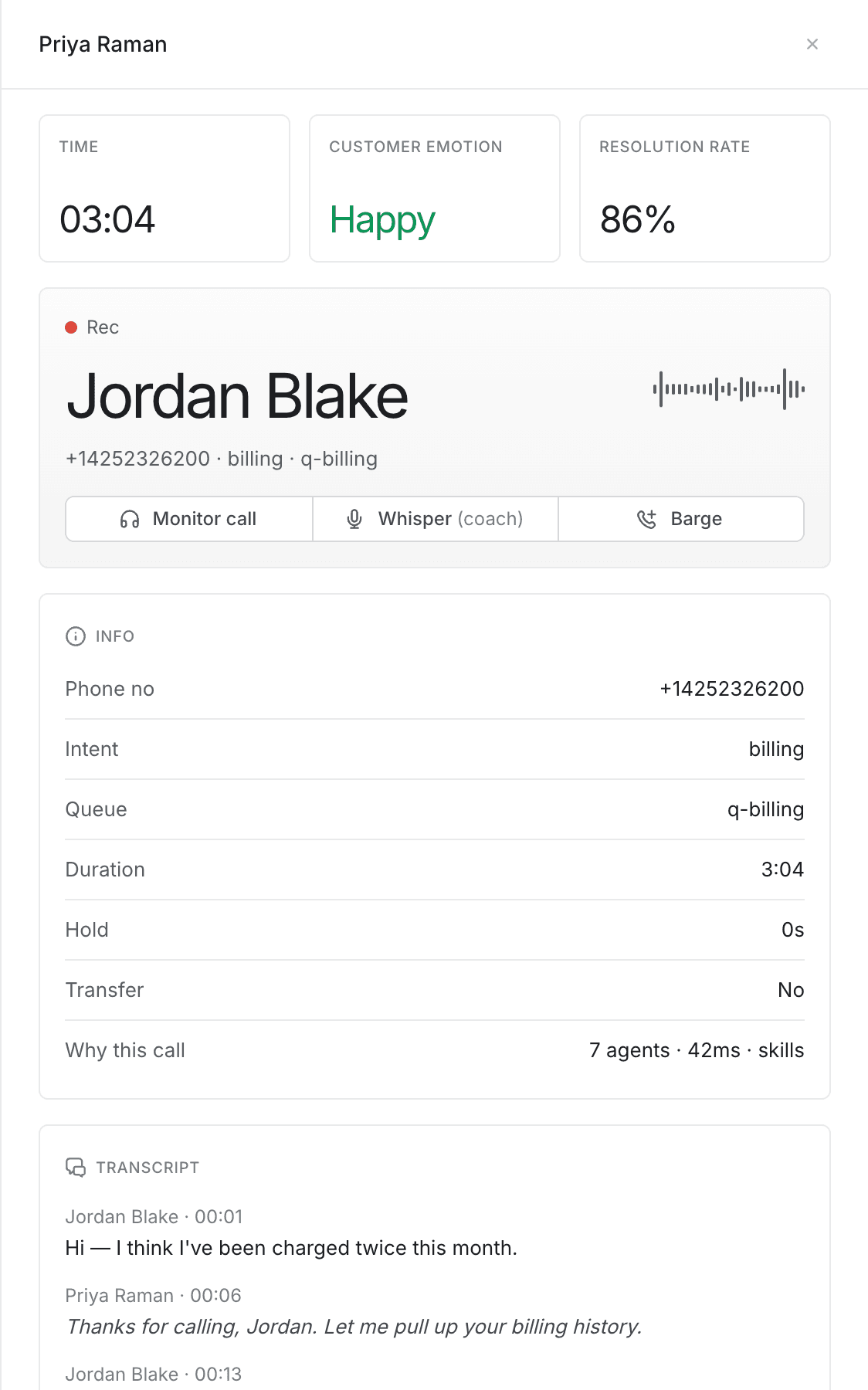
Selecting an agent opens a panel over the roster showing their current call. It is read-only: everything in it is there to tell you whether to act, and the controls for acting are covered in Monitoring a call.
The panel closes when you select the close control, or anywhere outside it. Closing it also ends any monitoring, whispering or barging session you had open.
Live measures
Three cards sit at the top, covering the call you are looking at:
| Card | What it shows |
|---|---|
| Time | How long the call has been running. |
| Customer emotion | The caller's current mood, coloured green or red the same way as the roster column. |
| Resolution rate | The agent's resolution rate for the shift — their figure, not this call's. |
A dot appears beside each label while you are listening or whispering. It marks the card as live. The dots are not shown once you barge in, because at that point you are part of the call rather than observing it.
The call card
The middle section carries the caller's name, their number, what they are calling about and which queue they came through. The moving bars to the right stand for call audio.
Above the name, a line tells you your own position on the call:
- Listening with a timer — you are monitoring.
- Rec with a red dot — the call is being recorded, and you are not listening in.
That line describes the call's recording, not your session. Seeing Rec does not mean your whisper or barge is being captured separately — it means the customer's call is recorded, as it would be without you.
Beneath it are the buttons for joining the call, and — once you have joined — a panel naming the mode you are in.
Info
The Info panel lists what the platform knows about the call itself:
| Row | Meaning |
|---|---|
| Phone no | The number the customer is calling from. |
| Intent | What the call was classified as when it arrived. |
| Queue | The queue that delivered it. |
| Duration | How long the call has been running. |
| Hold | Total time the customer has spent on hold, in seconds. |
| Transfer | Whether the call has already been transferred to this agent. |
| Why this call | How the call was routed: how many agents were considered, how long the decision took, and which routing mode was used. |
Hold time is worth a glance. A high hold figure alongside a red emotion reading usually explains the mood better than the transcript does.
Why this call answers "why did this agent get it?" — useful when a call looks mis-routed. Skills means it was matched on the agent's skills; cognitive means the routing model chose. The agent sees the same explanation on their own screen.
Transcript
The conversation is written out as it happens, refreshed every two seconds. Each line names who spoke — the agent by name, the customer by theirs — and how far into the call it was said.
Before anything has been transcribed, the panel reads Listening… the transcript will stream here.
An empty transcript does not mean an empty call. Nothing is transcribed while recording is paused, and calls the customer declined to have recorded are never transcribed at all. A blank panel on a long call usually means one of those, not a fault.
Sensitive details are removed before you see them. The transcript you get is the redacted view — card numbers and similar data are stripped rather than displayed to supervisors.
Use it to catch up on a call you have just joined without asking the agent to recap, and to check what was actually said before acting on a complaint.
Assist
Where the platform has offered the agent suggestions on this call, they appear at the bottom of the panel — the same items the agent is looking at, with the same headings and detail.
This is the quickest way to tell whether an agent is missing guidance that is already on their screen, or whether the guidance itself is wrong. The panel is left out entirely when there are no suggestions.
When the agent is not on a call
Opening an agent who has asked for help but is not connected shows This agent is not on a call. The panel is otherwise empty — there are no measures, no transcript and nothing to join.
That is the normal state for a help request raised just as a call ended. See Responding to help requests.