Customer and assist
The right-hand pane — who you are talking to, what they contacted you about before, their case, and the AI's suggestions.
Everything the desk knows about the person you are typing to.
Customer
The top section is the facts the channel and the platform have established.
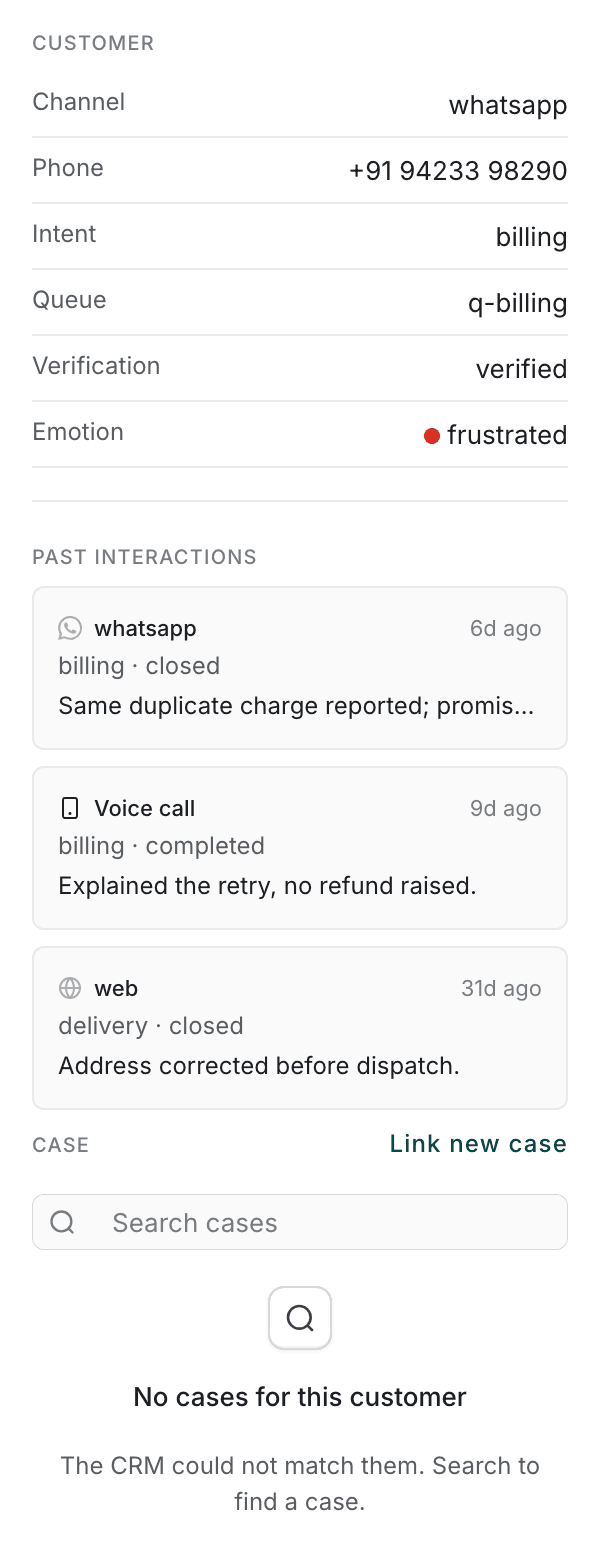
| Field | What it tells you |
|---|---|
| Channel | How they reached you — web chat, WhatsApp, and so on. |
| Phone | Their number, where the channel carries one. |
| Intent | What the platform believes the chat is about, from what has been said so far. |
| Queue | The queue the chat was routed through. |
| Verification | Whether their identity has been confirmed. |
| Emotion | How the conversation is reading. |
Verification is the one to read before you act. If it does not say the customer is verified, do not make account changes on their word. Where nothing has been established the pane says No verified customer yet rather than leaving the row blank.
Emotion
Emotion is a reading of the conversation, shown as a coloured dot and a word:
| Green | calm / positive |
| Amber | slipping |
| Red | frustrated |
It is an indication and nothing more. It does not change how the chat is routed and it is not a score anyone is marked on. Treat it as a prompt to re-read what the customer actually wrote.
Past interactions
Under the customer's details is what this person has contacted you about before — across every channel, not just chat. Each entry shows the channel, how long ago, the intent and outcome, and a one-line summary.
This is the section worth reading before you reply. A customer who phoned about the same charge yesterday should not be asked to explain it again.
Where there is no history, the pane says No prior interactions rather than showing an empty list.
Case
Below that is the customer's case in your organisation's CRM, if there is one.
If the CRM matched them, their cases are listed. Select one to open its full record — details, history, and a box for adding a work note.
If the CRM did not match them, the pane says so and offers a search: Link new case. That searches every case rather than just this customer's, because the common reason nothing matched is that the CRM has never seen this contact detail before. Pick the case the chat is about and it is attached to this conversation.
The case panel is the same one on every desk. What you link here is visible from Voice and Email too — it is attached to the customer, not to the chat.
AI assist
The bottom section suggests replies as the conversation develops.
Nothing is sent on your behalf. A suggestion is text for you to use, change or ignore, and it only reaches the customer if you send it. Where the chat has not developed far enough for a suggestion, the pane says Suggestions appear here during the chat.